Development of Educational Web Apps
I like to program.
The act of programming allows me to enter a state of flow and I find nothing more enjoyable than whiling the hours away as I dig into a complicated development task. Luckily I have been able to find a productive avenue for this passion and in this section, I will highlight five different web applications that I have had to pleasure to build. Each has not only been incorporated in courses at Winona State, but is also open-sourced and freely available to anyone on the web. Furthermore, they are build using modern technology to be fast, portable, and affordable.
Web Applications for Introducing Statistical Inference
Most statistics faculty at WSU use a pedagogical approach pioneered by Drs. Malone and Hook, where the idea of statistical evidence is introduced using random simulations on categorical studies. Subsequently, these ideas are formalized initially using the exact binomial test and later on in the semester with procedures such as a t-test or chi-square test.
There are several advantages to this approach. First, it avoids the details of more complicated procedures like the t or chi-square tests. Also, this approach allows the introduce core concepts of statistical inference much earlier than more traditional approaches, where these ideas appear in the final third of course.
Unfortunately, there are two problems with the technologies that was traditionally used to implement this pedagogy here at WSU and these first three web applications were built to address these issues.
A number of my colleagues have used these applications in their courses and I have received positive feedback from many. For example, here are comments from Dr. Kerby (drawn from her review of my year 2019-2020 PDR).
Todd has spent a lot of time using his programming expertise to design and implement; two experimental design and one simulation applet. I have used the simulation applet in my STAT 110 course, in addition to his exact binomial exact test applet created previously, and I think they are great! It’s easy for students to build a better understanding with no cost to them; all they need is the internet. I find the simulation applet very easy and straight forward for the students to use.
Here is what Dr. Tisha Hooks had to say in her letter of support.
… Todd has gone above and beyond to also improve our statistics program. One specific example I’d like to highlight is his creation of web applets that are now used across almost all sections of introductory statistics on campus. Before these applets were available, I required my students to purchase a program (which cost them about $8) that was used to run simulation studies (these simulation studies are used to intuitively introduce the idea of statistical inference). The software was easy to use for most students, but some did struggle and ended up falling behind early in the course. Todd identified this added cost to the students and the issues some students had using the program as hurdles to their learning, and he decided to do something about it. He created a beta version of his own applet, asked us to test it and give feedback, and then made the final version available for free on the web. I have been using this binomial simulation study applet in my introductory courses for about a year now, and it is fantastic. Not only is it free, but it’s much easier for students to learn and use than the software I used previously. In addition, he created another applet that simplifies the computation of binomial probabilities that is now a part of several introductory courses, as well. His applets have made my courses better, and my students and I both owe him a great deal of gratitude.
In the coming sections, I will highlight each web application.
The Binomial Simulation App
This binomial simulation app was built to replace Tinkerplots and facilitate our approach to looking for statistical evidence through random simulations. TinkerPlots program was the original vehicle for performing simulations, but has some drawbacks. It requires students to purchase a license through a website hosted in Australia (students’ banks occasionally decline the international purchase), has an non-intuitive interface, and currently doesn't support the newest versions of macOS. On top of these issues, creating simulations in Tinkerplots is overly complicated and simulations take a VERY long time to run.
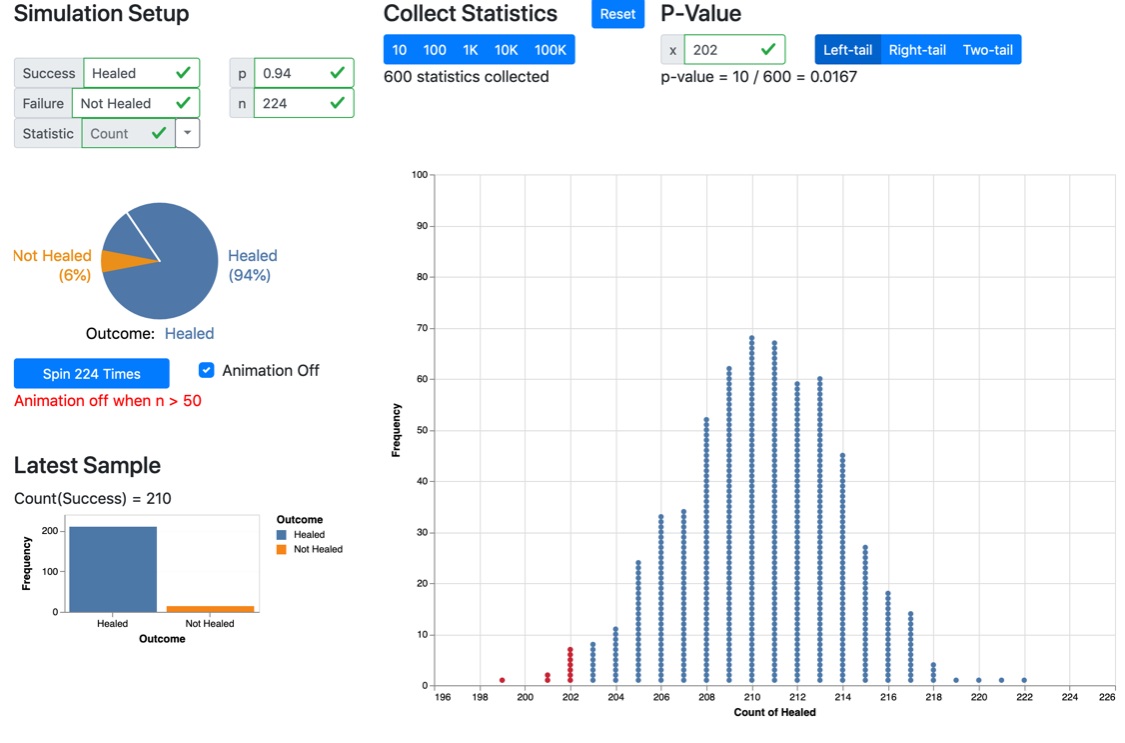
This application was quickly adopted by a number of my colleagues over the last few years. It is modern, running on the client-side in the user’s browser, more intuitive, and is FAST! Students master this application much quicker than Tinkerplots and running 1+ million trials takes seconds; where TinkerPlots took minutes to perform 1,000 trials and would crash if you tried many more trials.
Allowing for a very large number of trials reduces the variability in the simulation outcomes. I would argue that this reduces the overall cognitive load, as there is no need to account for the variability between two student’s results. Furthermore, a large number of trials also facilitates talking about the law of large numbers and moving on to the exact binomial test.
A Web Applications for the Exact Binomial Test
The Hooks-Malone approach transitions from the less-formal, more initiative simulations to the more-formal exact binomial test. Unfortunately, the technology used to run the exact binomial test varied from instructor to instructor and was frankly fairly clunky. Some instructors used a spread sheet to compute and add up individual probabilities (overly complicated in my view) and others relied on JMP to compute a p-value (a black box with its own quirks). I set out to create an application that would allow students to quickly and easily complete the p-value for the exact binomial test while still providing a bridge to understanding the connection between simulations and this procedure.
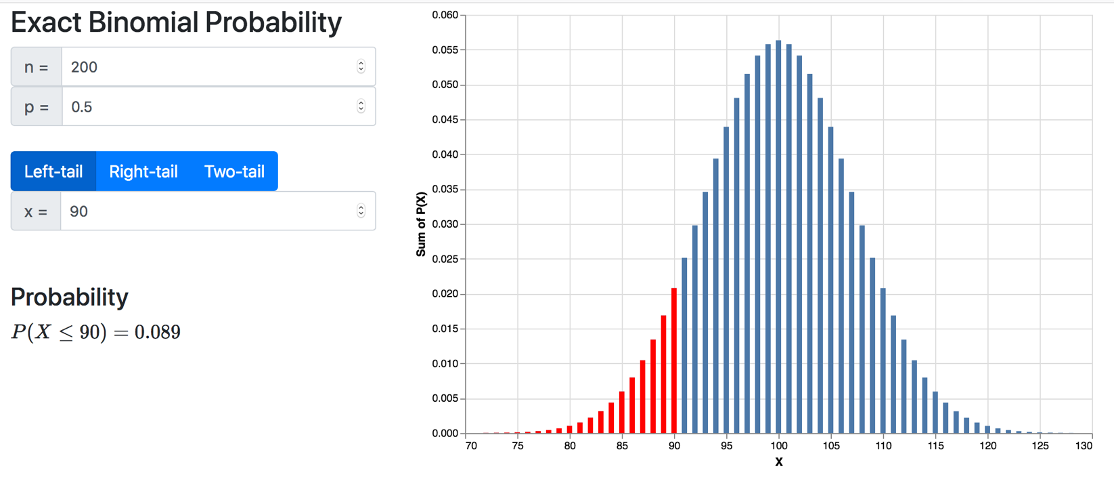
The exact binomial web application, allows students to compute the p-value for the exact binomial test (see Figure 2). Similar to the binomial simulation application, this app is fast, intuitive, free, affordable to maintain, and available on any device with a modern browser. The application is also being used by Dr. Silas Bergen (STAT 110) and Dr. Tisha Hooks (STAT 110, STAT 210, and STAT 310).
Exact Binomial Power App
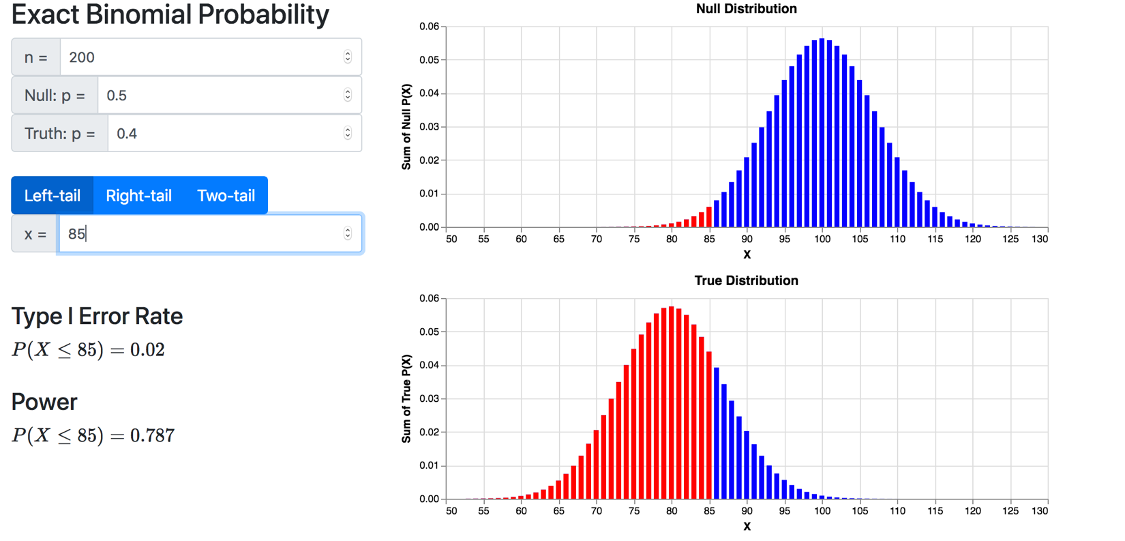
I have also created a second application which builds on the exact binomial application and focuses on computing the Type I error rate and power for an exact binomial test (see Figure 3). This application is used in STAT 310 by myself and Dr. Hooks.
Categorical Bootstrap App
The final application, the categorical bootstrap app is the latest addition and rounds out my suite of client-side web applications for one sample categorial data. This application allows students to apply the bootstrap to scenarios involving a single categorial sample and provides an intuitive method for introducing the concept of a confidence interval.
Many of the faculty at Winona State use the StatKey web apps as part of out class, but the StatKey CI for a Proportion app has some shortcomings, namely the interface for entering and subsequent lack of a plot of the data. I address these issues with this application and have subsequently replaced the StatKey app in STAT 110.
Web Applications for Designing and Running Virtual Experiments
STAT 321 Industrial Design of Experiments is a course focused on teaching students to design, implement, and analyze experiments. My colleagues have designed a suite of “laboratory” experiments intended to provide students with hands-on experience implementing and running an experiment from start to finish. These labs are a standard part of my design for face-to-face sections of STAT 321, but the response to Covid-19 threw a wrench in my original plans last spring semester. It is hard to fire catapults or drop helicopters virtually.
To replicate the experience of designing and running experiments virtually, I have developed two web apps that simulate an ultrasonic welding experiment (linked below). Anand et al. (2018), conducted an ultrasonic welding experiment and then fit a multivariate regression model to the results. My web application is based on their regression model and provide a random, repeatable simulation of this process. An important feature of this model is there is a nice local maximum inside the design space, allowing for the application of response surface designs.
Two Simulated Experiment Web Applications
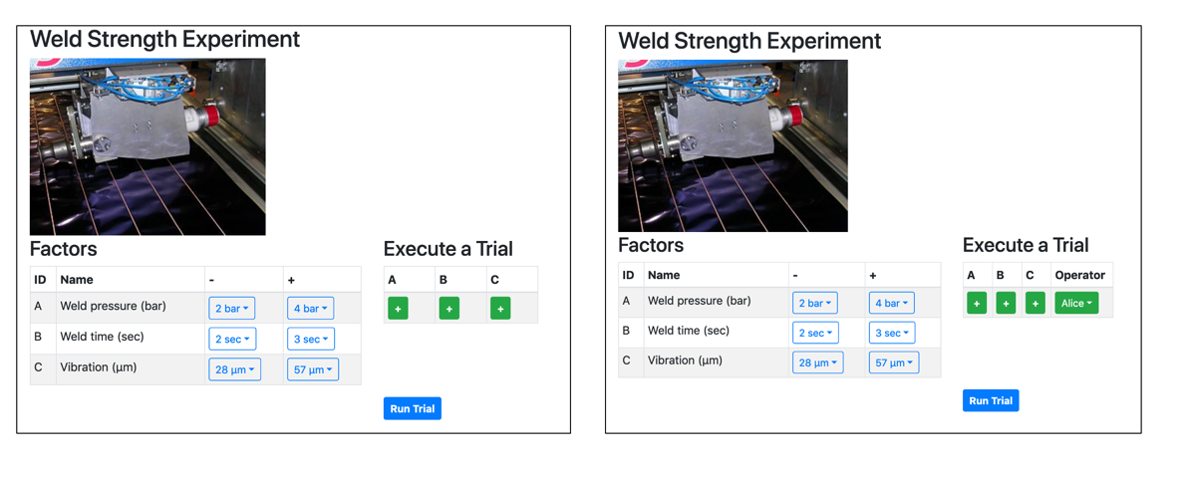
The two applications are illustrated in Figure 8, where left-hand application facilitates a full or fractional factorial design, while right-hand application adds an imaginary operator to allow for blocked designs.
I have several additions that I would like to make to these applications. First, I would like to improve the underlying model, perhaps by using some of the other models found in the literature. Second, I would like to add the option to perform trials at center or radial points, which would facilitate a broader range of designs. There are also tentative plans to add additional factors, covariates, temporal effects, and/or other information (like cost and time) to allow for wider application. Finally, I also plan to abstract my current code to allow turn this site into a framework that can be applied to another scenario without much of a hassle. This would allow me to build an entire suite of virtual experiments that are open source and can be shared with the statistics education community.
Conclusion
In this section, evidence was provided of substantial contributions in the area of technologically delivered academic products (See Appendix G of the Master Agreement) in the form of six web applications that are used my colleagues, as well as my own, courses. Each web app is modern, fast, and easy to use; and all are freely available on the web on any device with a modern browser.